
Microsoft PowerPoint Price Snapshot
Microsoft PowerPoint by Microsoft Corporation is free to download on the Google Play, and offers in-app purchases. It holds a 4.8★ rating from 3.9M reviews.
Listing last updated: 2026-03-09. Source: public Google Play data, compiled via the App Pricing Lab methodology.
4.8★
3.9M reviews
1.0B
Installs
Jan 6, 201
Released
2026-03-09
Last Updated
Rankings
| Category | Collection | Rank | Date |
|---|---|---|---|
| PRODUCTIVITY | topselling_free | #24 | 2026-03-10 |
| PRODUCTIVITY | topgrossing | #78 | 2026-03-10 |
Screenshots

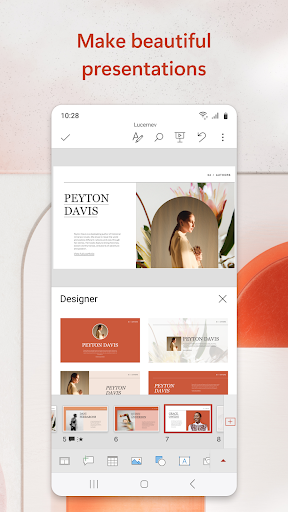


About Microsoft PowerPoint
The presentation and slides app that you can carry with you wherever you go – Microsoft PowerPoint. Make a slideshow with music, graphics and charts. Templated PowerPoint slideshows help make your quarterly reports, yearly reports and more shine.
Get the familiar slideshow tool you know and love with the PowerPoint app. Create, edit, and view slideshows and present quickly and easily from anywhere. Present with confidence and refine your delivery, using Presenter Coach.
Present slideshows and access recently used PowerPoint files quickly while on the go. Presentations sync seamlessly across devices, so you won’t have to worry about multiple file versions when you work on PowerPoint mobile.
Give presentations with training from Presenter Coach, an AI tool designed to help with public speaking. Practice presentations on your own using a presentation timer with Presenter Coach. Presenter Practice presentations with real-time suggestions from Coach to help you adjust your pacing, avoid “umms” and speak confidently.
Make a slideshow with powerful and customizable presentations that make you stand out. Present and create slides from anywhere. Presentations made on PowerPoint help make an impact in the way you present and collaborate. With PowerPoint, you can collaborate and edit your ppt or pptx files in real time and customize it on the go.
Present Slideshows with Confidence
• Slideshows are easy to edit & present using PowerPoint mobile
• Present a slideshow free of errors with the help of Presenter Coach
• This presentation maker gives you the option to create presentations from scratch or work on pre-existing slides
• Make a slideshow & present your point clearly & confidently using presentation view on any device
• Practice slideshow presentations for your yearly reports with the Presenter Coach to master public speaking
Make Presentations That Leave a Lasting Impression
• An expertly crafted presentation is always a winner
• Presentation timer lets you deliver your slideshows & present information concisely
• Presentation maker: Take advantage of a slides app with highly customizable tools & present your slideshows with confidence
• Photo Slideshow: Add any photo or take one right from the app
• Slideshow video maker: Insert any video or record a new one right from your phone
Collaborate with Others Easily
• PowerPoint makes it easy for you to collaborate with others
• Make a slideshow & share with your team to get feedback & edits
• View presentation permissions and see who’s working on which slides
• Slides can have integrated comments letting you stay on top of changes & feedback
REQUIREMENTS
1 GB RAM or above
Become a skilled presentation maker & take advantage of the slides app with highly customizable tools and present your slideshows with confidence
Unlock the full Microsoft 365 experience with a qualifying Microsoft 365 subscription for your phone, tablet, PC, and Mac.
Microsoft 365 subscriptions purchased from the app will be
Frequently Asked Questions
Is Microsoft PowerPoint free?
Yes, Microsoft PowerPoint is free to download. It offers in-app purchases.
What is the rating of Microsoft PowerPoint?
Microsoft PowerPoint has a 4.8 out of 5 star rating based on 3.9M reviews on the Google Play.
Who made Microsoft PowerPoint?
Microsoft PowerPoint was developed by Microsoft Corporation. Visit their website at https://products.office.com.
Developer
Explore More
Related Productivity Apps








Share & Embed
Use these badges on your website or blog to link back to this app's data.
Rating Badge
<a href="https://apppricinglab.com/app/google_play/com.microsoft.office.powerpoint"><img src="https://apppricinglab.com/api/badge/rating?store=google_play&app=com.microsoft.office.powerpoint" alt="Microsoft PowerPoint rating on App Pricing Lab" /></a>IAP Badge
<a href="https://apppricinglab.com/iap/google_play/com.microsoft.office.powerpoint"><img src="https://apppricinglab.com/api/badge/iap?store=google_play&app=com.microsoft.office.powerpoint" alt="Microsoft PowerPoint IAP prices on App Pricing Lab" /></a>Rank Badge
<a href="https://apppricinglab.com/app/google_play/com.microsoft.office.powerpoint"><img src="https://apppricinglab.com/api/badge/rank?store=google_play&app=com.microsoft.office.powerpoint" alt="Microsoft PowerPoint ranking on App Pricing Lab" /></a>