
Edge Gestures Price Snapshot
Edge Gestures by Total_Apps is priced at $1.99 on the Google Play, with no in-app purchases. It holds a 4.3★ rating from 4.6K reviews.
Listing last updated: 2026-02-13. Source: public Google Play data, compiled via the App Pricing Lab methodology.
4.3★
4.6K reviews
50.0K
Installs
Nov 29, 20
Released
2026-02-13
Last Updated
Rankings
| Category | Collection | Rank | Date |
|---|---|---|---|
| TOOLS | topselling_paid | #78 | 2026-03-10 |
Screenshots


About Edge Gestures
EdgeGestures lets you perform your most frequent actions quickly with simple gestures on the screen edges. It makes one-handed usage much more convenient and efficient.
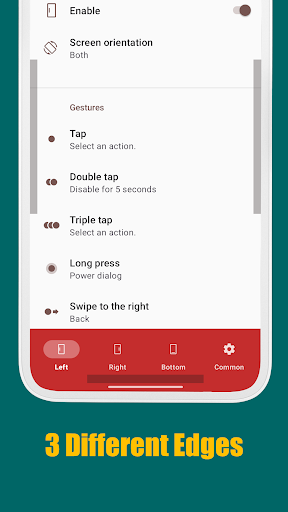
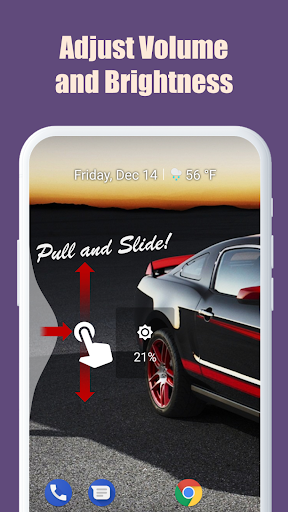
Supported Gesture Types: Tap, Double tap, Long press, Swipe, Swipe diagonally, Swipe and hold, Pull and slide, and Pie controls.
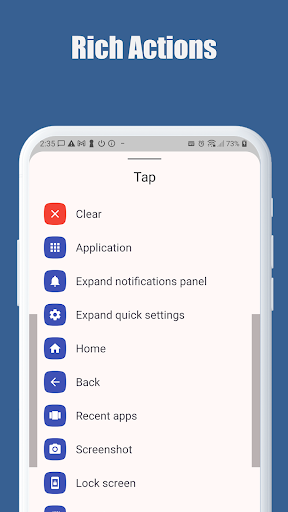
Key Supported Actions:
1. Launch any application or shortcut.
2. System navigation: Back, Home, and Recent apps.
3. Expand status bar: Notifications or Quick settings.
4. Scroll to top (Android 6.0 or higher).
5. Power menu dialog.
6. Adjust brightness or media volume.
7. Fast scroll.
8. Toggle split screen.
9. Switch to the previous app.
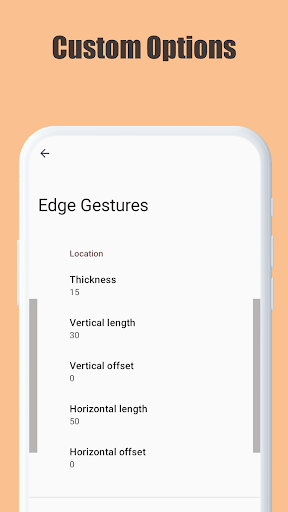
Customization: The edge area is fully customizable. You can adjust the thickness, length, and position to perfectly suit your preferences. EdgeGestures requires only the permissions necessary for its functionality.
Accessibility Service API Disclosure: EdgeGestures uses the Accessibility Service API to enable core system-level features. This permission is used ONLY for the following purposes:
- Expand notifications panel
- Expand quick settings
- Home
- Back
- Recent apps
- Tap through
- Screenshot
- Power dialog
- Scroll to start
- Fast scroll
- Toggle split screen
- Lock screen
Privacy Note: No other information is collected, processed, or shared through this permission. Your privacy is our priority.
Frequently Asked Questions
Is Edge Gestures free?
No, Edge Gestures costs $1.99.
What is the rating of Edge Gestures?
Edge Gestures has a 4.3 out of 5 star rating based on 4.6K reviews on the Google Play.
Who made Edge Gestures?
Edge Gestures was developed by Total_Apps.
Developer
Explore More
Related Tools Apps








Share & Embed
Use these badges on your website or blog to link back to this app's data.
Rating Badge
<a href="https://apppricinglab.com/app/google_play/com.ss.edgegestures"><img src="https://apppricinglab.com/api/badge/rating?store=google_play&app=com.ss.edgegestures" alt="Edge Gestures rating on App Pricing Lab" /></a>Rank Badge
<a href="https://apppricinglab.com/app/google_play/com.ss.edgegestures"><img src="https://apppricinglab.com/api/badge/rank?store=google_play&app=com.ss.edgegestures" alt="Edge Gestures ranking on App Pricing Lab" /></a>