
Compass Eye Bearing Compass Price Snapshot
Compass Eye Bearing Compass by Pocket Mariner Ltd. is priced at $4.99 on the Apple App Store, with no in-app purchases. It holds a 4.6★ rating from 5 reviews.
Listing last updated: 2025-10-02. Source: public Apple App Store data, compiled via the App Pricing Lab methodology.
4.6★
5 reviews
2011-10-18
Released
2025-10-02
Last Updated
Rankings
| Category | Collection | Rank | Date |
|---|---|---|---|
| NAVIGATION | top-paid | #49 | 2026-03-12 |
| NAVIGATION | top-paid-ipad | #83 | 2026-03-12 |
Screenshots
About Compass Eye Bearing Compass
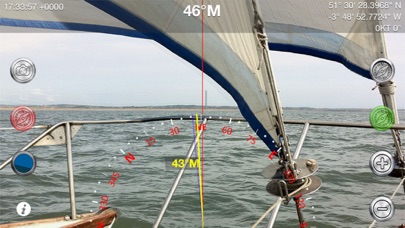
Professional Augmented Reality Bearing Compass with real-time camera and map views, bearing markers and up to 8x zoom providing Compass Binocular features at a fraction of the cost.
"..works nicely, we tried it out at the Voiles d'Antibes...the Captain's response when trying it out was 'Cool!'." - Boatbookings, The World's Leading Online Yacht Charter Broker
Compass Eye can be used to help with navigation on land, sea or air as a bearing or marching compass.
Compass Eye is fully gimballed and works accurately in all orientations and angles when held vertical and horizontal.
“This app is a compass on steroids! It is fully gimballed so it will work in any orientation on your iPhone or iPad. You can use it on land while hiking or as a hand bearing compass on the ocean or in the air while flying.” i-Marine Apps
"The app's compass works way better than the iOS default compass and I don't have to wave my iPhone in the air every time I launch the app." Gizmodo Review (App of The Day, 6th December).
MAIN FEATURES
- Real time, accurate in all orientations
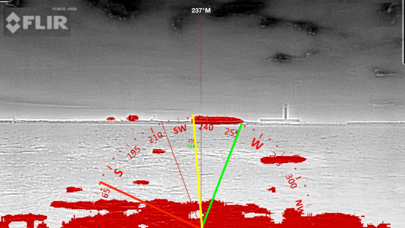
- Compass overlaid on live camera view
- 8x Digital zoom
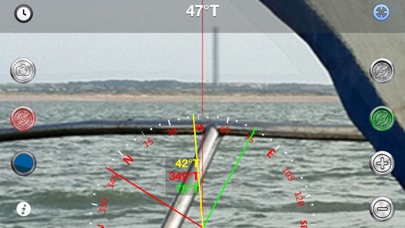
- Back, transit, or collision bearing markers
- Draggable Green and red bearing lines
- Triangulation bearings
- Optional time, date and GPS location information
- Magnetic or True North setting with variation based on location
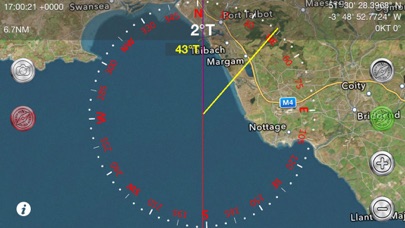
- Live map view with position and track
- Artificial Horizon with roll and pitch readout
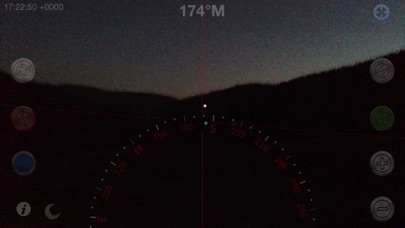
- Night Vision and FLIROne® Infra-red support
- Location sharing
- Longitude and latitude degree display in DD° MM.mmm', DD° MM' SS.ss" and now DD.ddd°
- iOS Dark mode support
- Full screen on iPhoneX and later devices
Enabling GPS also shows the Speed Over Ground (SOG) , Course Over Ground (COG) and optional COG bearing (purple).
HOW TO USE
Taking a bearing - look through your iPhone at the distant object, line it up with the centre line and read off the bearing! Zoom in to get more accuracy.
Setting a bearing - look through your iPhone at the point you want to get to, tap the Bearing button (Top right) and follow the yellow bearing line.
Setting a bearing from the map - lay the iPhone flat, rotate or drag a bearing line to line up with the point you are aiming for and follow that bearing.
Triangulation - use the three bearing lines - yellow green and red to take bearings on 3 points. Capture the view including compass, bearings, time and location information (Camera button on left of screen) and then use the photo to plot a fix on a chart.
Clearance bearings to a point on an approach - set one line to the minimum bearing (e.g. the angle the target must bear greater than) and the other line to the maximum bearing and navigate between the two. Use the colours according to the IALA lateral markings to help you remember which way to steer. e.g. in North America use red for the minimum bearing and green for the maximum (vice-versa in Europe!).
SPECIFICATIONS
Based on the iPhone camera the image specification at full zoo
Frequently Asked Questions
Is Compass Eye Bearing Compass free?
No, Compass Eye Bearing Compass costs $4.99.
What is the rating of Compass Eye Bearing Compass?
Compass Eye Bearing Compass has a 4.6 out of 5 star rating based on 5 reviews on the Apple App Store.
Who made Compass Eye Bearing Compass?
Compass Eye Bearing Compass was developed by Pocket Mariner Ltd.. Visit their website at https://apps.apple.com/us/developer/pocket-mariner-ltd/id719592131?uo=2.
Developer
Explore More
Compare Compass Eye Bearing Compass with...
 Compass Eye Bearing Compass vs Love Island USA
 Compass Eye Bearing Compass vs Peacock TV: Stream TV & Movies
 Compass Eye Bearing Compass vs Kalshi: Trade Football & more
 Compass Eye Bearing Compass vs MapQuest GPS Navigation & Maps
 Compass Eye Bearing Compass vs Capital One Mobile
 Compass Eye Bearing Compass vs NCAA March Madness Live
Related NAVIGATION Apps


Share & Embed
Use these badges on your website or blog to link back to this app's data.
Rating Badge
<a href="https://apppricinglab.com/app/apple/472314819"><img src="https://apppricinglab.com/api/badge/rating?store=apple&app=472314819" alt="Compass Eye Bearing Compass rating on App Pricing Lab" /></a>Rank Badge
<a href="https://apppricinglab.com/app/apple/472314819"><img src="https://apppricinglab.com/api/badge/rank?store=apple&app=472314819" alt="Compass Eye Bearing Compass ranking on App Pricing Lab" /></a>