
QuickMo Slideshow Story Editor Price Snapshot
QuickMo Slideshow Story Editor by Cardinal Blue is free to download on the Apple App Store, with no in-app purchases. It holds a 4.8★ rating from 347 reviews.
Listing last updated: 2020-11-16. Source: public Apple App Store data, compiled via the App Pricing Lab methodology.
4.8★
347 reviews
2020-08-22
Released
2020-11-16
Last Updated
Rankings
| Category | Collection | Rank | Date |
|---|---|---|---|
| PHOTO_AND_VIDEO | keyword:photo and video | #60 | 2026-03-12 |
Screenshots


About QuickMo Slideshow Story Editor
Share more with creative slideshows! QuickMo makes it easy to pull everything together in an unexpected way. Create a slideshow video with multiple photos from your camera roll in seconds.
Key Features
・Easy Start: Make a video from photos quickly by simply selecting from your camera roll.
・Crop Tool: Adjust the video canvas size to make it look perfect as a square post or a vertical story.
・Speed Adjuster: Change the playback speed to create fun effects.
・Transitions: Apply transitions to add some final polish to a slideshow.
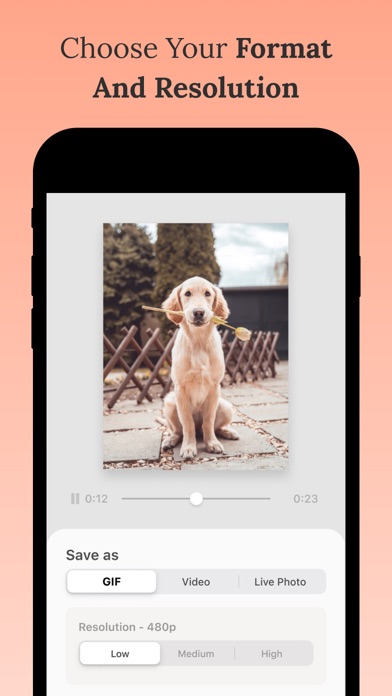
・Export Control: Choose your export format (Video/GIF/Live Photo) and resolution.
Our Favorite Ways to Use QuickMo
・Summarize all the best moments from a trip in a slideshow that is concise and easy to share everywhere.
・Grab all of your candid photos from a party and combine them in a video instead of having to pick just one.
・Try making a stop motion video message for a memorable birthday post to a friend!
Frequently Asked Questions
Is QuickMo Slideshow Story Editor free?
Yes, QuickMo Slideshow Story Editor is free to download.
What is the rating of QuickMo Slideshow Story Editor?
QuickMo Slideshow Story Editor has a 4.8 out of 5 star rating based on 347 reviews on the Apple App Store.
Who made QuickMo Slideshow Story Editor?
QuickMo Slideshow Story Editor was developed by Cardinal Blue.
Developer
Explore More
Related Photo & Video Apps


Share & Embed
Use these badges on your website or blog to link back to this app's data.
Rating Badge
<a href="https://apppricinglab.com/app/apple/1527210837"><img src="https://apppricinglab.com/api/badge/rating?store=apple&app=1527210837" alt="QuickMo Slideshow Story Editor rating on App Pricing Lab" /></a>Rank Badge
<a href="https://apppricinglab.com/app/apple/1527210837"><img src="https://apppricinglab.com/api/badge/rank?store=apple&app=1527210837" alt="QuickMo Slideshow Story Editor ranking on App Pricing Lab" /></a>