
4.5★
1.3K reviews
2017-08-03
Released
2026-02-21
Last Updated
Rankings
| Category | Collection | Rank | Date |
|---|---|---|---|
| PHOTO_AND_VIDEO | top-paid | #37 | 2026-03-12 |
| PHOTO_AND_VIDEO | keyword:camera apps | #104 | 2026-03-12 |
Screenshots




About Camera M - Pro Manual Controls
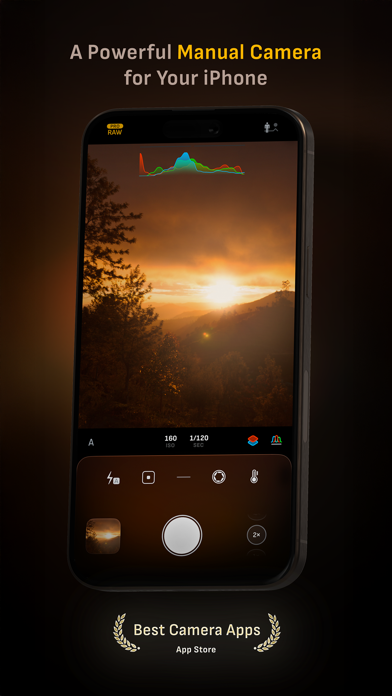
Camera M is a professional manual camera designed to do one thing exceptionally well – help you capture beautiful photos at the highest possible quality with powerful, precise manual controls akin to a DSLR.
HIGHLIGHTS
• Fluid gesture-based native manual controls with Fine-Tuning feature
• iOS 26 optimization with Liquid Glass design
• Zero-process RAW support for the most natural look
• Max Image Processing to ensure the absolute best image quality
• ProRAW*, RAW, HEIF, JPEG, TIFF, and PNG image formats
• Single, Burst, Timer, Live, Depth*, Dual Photo*, and Bracket shooting modes
• Triple Photo mode with simultaneous ultra-wide, wide-angle, and telephoto camera capture*
• Minimum focus distance display for macro photography
• Intelligent Focus Tracking
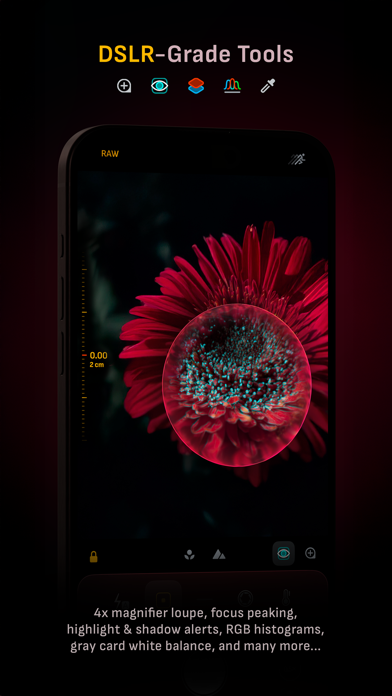
• Focus Peaking and 4x magnifier loupe with panning function
• Live RGB and RGB luminance histograms
• Manual gray card calibration
• Great widgets for photography
• Darkroom integration
CAMERA CONTROLS
– Manual focus
– Macro and Scene focus presets
– Exposure bias
– Manual ISO & exposure duration adjustments
– ISO & exposure duration semi-priority modes
– Manual white balance temperature and tint
– White balance presets
– Gray card white balance calibration
– Auto, on, and off flash modes
– Manual torch brightness level
– Manual switching between Ultra Wide, Wide, and Telephoto cameras*
– Digital pinch zoom with 10x range
– Camera Control support for all manual controls
– Lock Screen camera capture support
IMAGE FORMATS
– Apple ProRAW*
– RAW with stabilization
– HEIF with optional minimum compression
– JPEG with optional minimum compression
– TIFF
– PNG
– Live Photo
– P3 wide color support*
SHOOTING MODES
– Single
– Burst
– Timer
– Depth*
– Dual/Triple Photo*
– Live Photo*
– Bracket
TOOLS
– Exposure offset gauge
– Intelligent Focus Tracking
– Live focus peaking assistant
– 4x magnifier loupe with panning function
– Minimum focus distance display
– Live RGB and RGB luminance histograms
– Highlight & shadow alert display
– Horizon level with available pitch tracking and flat options
– Rule of Thirds, Golden Ratio, Quadrant, and Square grids
– Siri Shortcuts and App Shortcuts
– Detailed camera specifications display with PDF export
MAX IMAGE PROCESSING
– Deep Fusion and Smart HDR support for iPhone 11 and later.
– Ensures maximum image quality with better noise reduction, image stabilization, and additional processing for all other iPhones and iPads
ZERO-PROCESS RAW
– Capture standard RAW files with no extra processing
PHOTO LIBRARY
– Summarized and full EXIF metadata display
– Location data display with compass and elevation
– RGB and RGB luminance histogram displays
– Access to all photo albums and folders
WIDGETS
– Home Screen: Golden Hour, EXIF, and Cameras
– Lock Screen: Cameras and Golden Hour
– Control Center: Focus, exposure, and white balance
APPLE WATCH SUPPORT
– Shutter button control
– Sunrise, sunset, and Golden Hour display with sun position indicator
ERGONOM
Frequently Asked Questions
Is Camera M - Pro Manual Controls free?
No, Camera M - Pro Manual Controls costs USD7.99.
What is the rating of Camera M - Pro Manual Controls?
Camera M - Pro Manual Controls has a 4.5 out of 5 star rating based on 1.3K reviews on the Apple App Store.
Who made Camera M - Pro Manual Controls?
Camera M - Pro Manual Controls was developed by bxb. Visit their website at https://www.camera-m.com.
Developer
Explore More
Related Photo & Video Apps


Share & Embed
Use these badges on your website or blog to link back to this app's data.
Rating Badge
<a href="https://apppricinglab.com/app/apple/1239098425"><img src="https://apppricinglab.com/api/badge/rating?store=apple&app=1239098425" alt="Camera M - Pro Manual Controls rating on App Pricing Lab" /></a>Rank Badge
<a href="https://apppricinglab.com/app/apple/1239098425"><img src="https://apppricinglab.com/api/badge/rank?store=apple&app=1239098425" alt="Camera M - Pro Manual Controls ranking on App Pricing Lab" /></a>