
Adobe Acrobat Reader: Edit PDF
▶️ Google PlayProductivityFreeIn-App PurchasesContains AdsEveryone
4.5★
7.6M reviews
500.0M
Installs
May 24, 20
Released
2026-03-06
Last Updated
Rankings
| Category | Collection | Rank | Date |
|---|---|---|---|
| PRODUCTIVITY | topgrossing | #6 | 2026-03-10 |
| PRODUCTIVITY | topselling_free | #8 | 2026-03-10 |
Screenshots




About Adobe Acrobat Reader: Edit PDF
Major new updateMajor new updates: Collaborate and share your files in PDF Spaces, turn your document summaries into podcast-style audio, and create standout content in Acrobat Reader with design tools powered by Adobe Express.
The world’s most trusted PDF reader, PDF editor, and PDF maker with more than 635 million installs. View, share, annotate, add comments, and sign documents - all in one app. You can store your files online and read documents anywhere.
Get your 7-day free trial and try all the features of Acrobat Reader.
Paid featuresAdobe Acrobat AI Assistant
• Work across multiple files in one place with PDF Spaces. Collaborate, store, and use AI Assistant across files
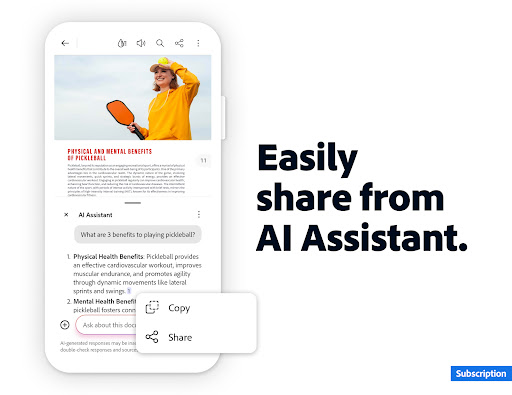
• Use voice or text prompts with AI Assistant chatbot
• Ask questions and get cited answers about details in your document, including charts, graphs, and tables with Figures Q&A
• Easily share the responses you get
• Try voice support to ask queries and have answers read aloud.
• Instantly generate summaries from your PDFs with Generative AI Summaries
• Get content for emails, text, study notes, blogs, and more
[Adobe Acrobat AI Assistant is a paid feature*, free for a limited time]
Edit PDFs
• With our PDF editor, edit text and images directly in your PDF (mobile only)
• Fix typos or add paragraphs with the PDF editor
• Easily add, delete, or rotate any image
• Use this PDF signer and PDF viewer to get your docs just right
Recognize text
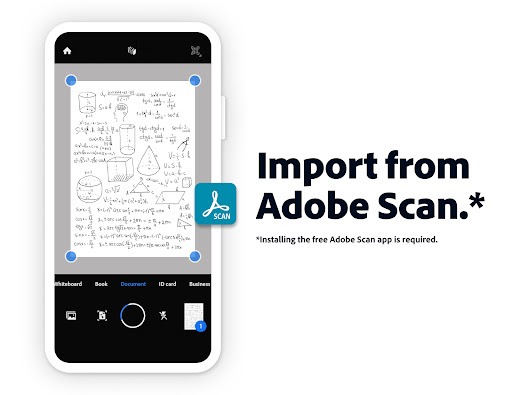
• Optical Character Recognition (OCR) turns scanned PDFs into searchable, editable text to use in other formats
Merge & organize PDFs with PDF converter
• Split or combine multiple files into one PDF with PDF converter
• Use the PDF editor to insert, delete, rotate, crop & reorder pages in your PDF file
Create, convert & export PDFs
• Easily convert to PDF from any file type including Microsoft, Google Docs, and images
• Export and convert PDFs to Microsoft Word, Excel, PowerPoint, or various image files
• Convert web pages to PDFs
Compress & highly secure PDFs
• Compress PDF files for easy saving and sharing
• Password Protect PDF documents
Have your PDF read aloud
• Listen to your PDFs on the go, great for reading support
• Choose free voices or upgrade for high-quality options
Subscribe now to access all these features and use Acrobat across mobile and web platforms.
Free-to-use featuresPDF signer: Fill & Sign
Adobe Fill & Sign is free & available in Acrobat Reader. A form filler and PDF signer that lets you fill, sign, and send
Liquid mode for optimal PDF viewing
• Get the best PDF reading experience with this PDF viewer
• Search, navigate & adjust font size or spacing to fit your screen
Annotate PDFs
• Add sticky notes, comments, and highlight text
Store & manage files
• Link online storage accounts like Microsoft OneDrive, Dropbox, or Google Drive
• Star files to quickly open important documents
Connect the PDF viewer and reader to Google Drive
• A PDF creator that lets you edit, compress, and export Google Drive
Frequently Asked Questions
Is Adobe Acrobat Reader: Edit PDF free?
Yes, Adobe Acrobat Reader: Edit PDF is free to download. It offers in-app purchases.
What is the rating of Adobe Acrobat Reader: Edit PDF?
Adobe Acrobat Reader: Edit PDF has a 4.5 out of 5 star rating based on 7.6M reviews on the Google Play.
Who made Adobe Acrobat Reader: Edit PDF?
Adobe Acrobat Reader: Edit PDF was developed by Adobe. Visit their website at https://helpx.adobe.com/acrobat/mobile-app-faq.html.







